SiteSetu · for contractors, builders and home owners
BOQ from your drawingsSiteSetu measures every quantity to IS 1200, in Excel you can check.
Send your PDF or DWG drawings. We measure every item and send an item-wise BOQ, with the measurement sheet behind each quantity. A civil engineer checks it before it reaches you.
- PDF or DWG drawings
- IS 1200 measurement
- Excel + PDF
From ₹2,500 per project First project 50% off (up to ₹5,000), minimum ₹2,500
From the BOQ we delivered for a G+1 house. Tap a line to see how it was measured.
BasisIsolated footings
Structural footing layout: sum of 73 mesh volumes.
Reinforced concrete
BOQ prices
What decides the price- From ₹2,500
- per project, final quote after we see your drawings
- IS 1200
- measurement, every deduction shown
- Excel you can check
- a measurement sheet behind every quantity
- Engineer-checked
- every sheet, before delivery
| Project and scope | Price per project |
|---|---|
| Simple houseEstimate from your floor plans | from ₹2,500 |
| Luxury home or villaMaterial-wise BOQ. From floor plans, section and elevations | from ₹10,000 |
| High-rise10 typical floors, 3 basements, 2 podiums Structure: RCC concrete, steel with BBS and formwork. Full: structure plus masonry, plaster, flooring, doors, windows and finishes. | ₹25,000 structure₹50,000 full BOQ |
| Infra and bridgesDrawing set and measured scope confirmed in the quote. | Quote-based, ₹25,000 – ₹1,00,000 |
Opening prices; final quote after we see your drawings. Send PDF or DWG drawings, or a Drive link. We confirm the included trades, assumptions, deliverables and how any first-project offer applies before work starts.
How the BOQ service works
Send the drawing. Get a BOQ you can check.
Every quantity traces back to a measurement sheet, and the BOQ comes with the 3D model it was measured from. Rates go on your basis: DSR, SSR or market.
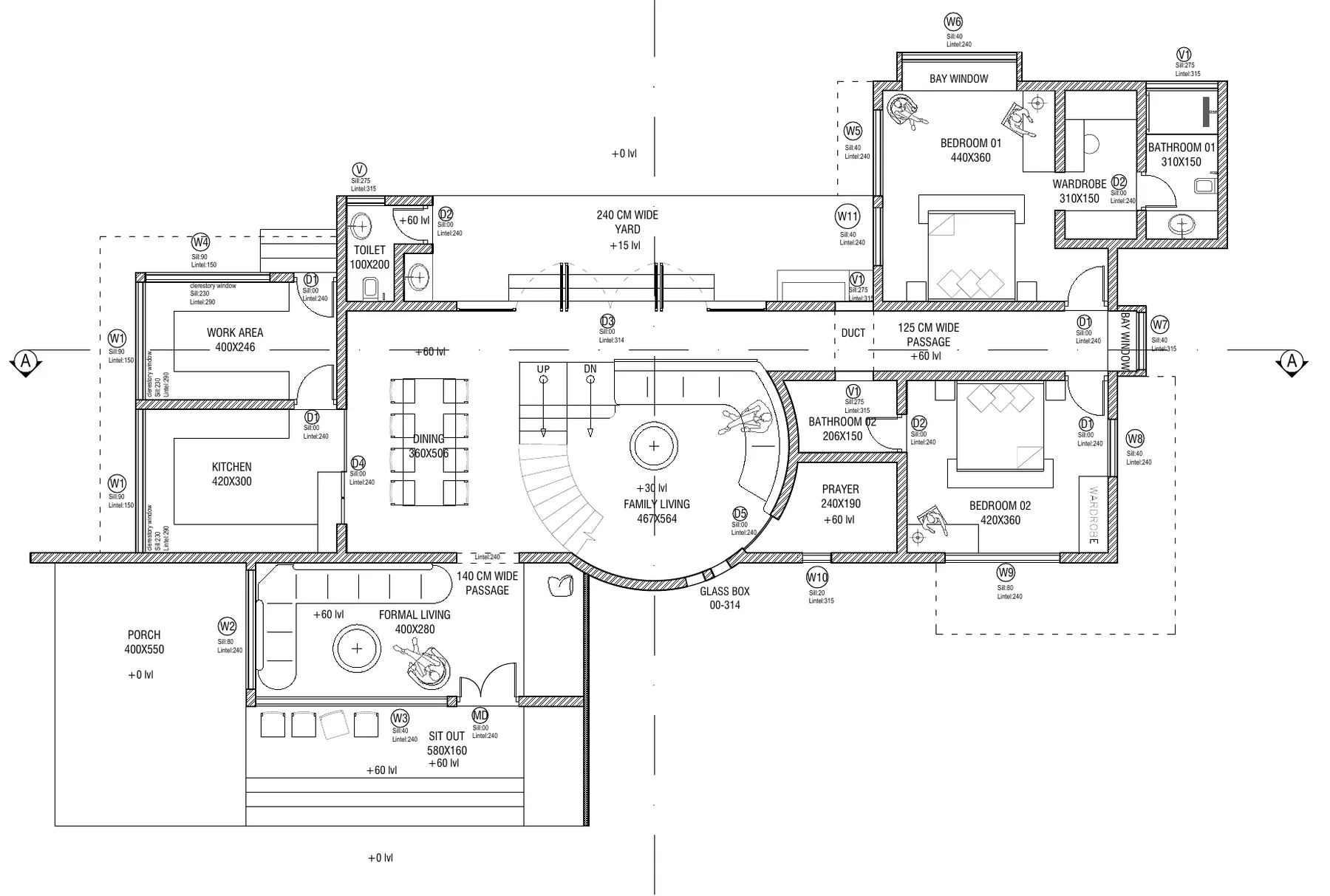
What you send: the drawing
The architect's ground floor plan, one sheet of a 16-sheet set.
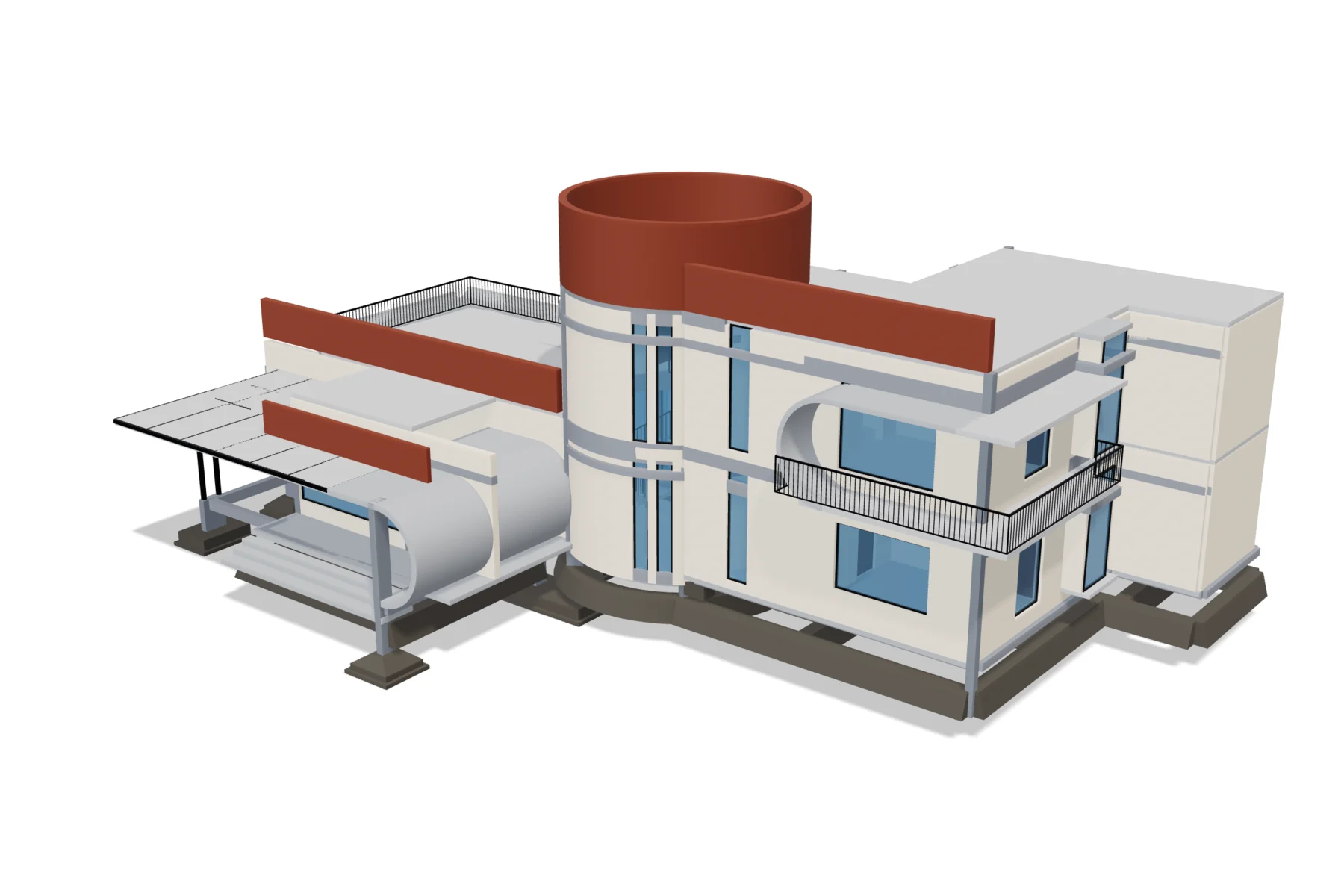
What you get back: the 3D model
434 elements, footings to parapet.
...and the BOQ measured from it
Excerpt, 9 of 60 lines
| Item | Unit | Quantity |
|---|---|---|
| Excavation in pits for footings | m³ | 314.04 |
| PCC blinding, 50 mm, under footings | m³ | 18.33 |
| RCC isolated footings | m³ | 55.40 |
| RCC slab, ground floor | m³ | 22.14 |
| RCC slab, first floor | m³ | 22.35 |
| Formwork, slab soffit and edges | m² | 884.02 |
| Block walls, ground floor, net of openings | m³ | 58.94 |
| Wall plaster, both faces | m² | 1,345.20 |
| Railings and balustrades | m | 43.68 |
Quantities from the delivered BOQ. Rates are applied on your basis: DSR, SSR or market. See the full sample BOQ
From ₹2,500 per project; first project 50% off (up to ₹5,000), minimum ₹2,500
Before you order, you see a sample BOQ from a similar real job, with its measurement sheets. Most BOQs arrive in hours; 48 hours at most.
BOQs we have delivered
Real projects measured from their drawings. Client names and places are withheld.
- BuilderG+2 Villa: Structural BOQ, Then Full BOQA builder sent the CAD drawings for one villa type. We measured the structure with a bar bending schedule, then every trade, and explained why his own RCC sheet was 50 m³ higher.Read the case study →133.35 m³RCC (M25), house13,178 kgSteel (Fe500), house
- Redevelopment developerMumbai Redevelopment Tower: BOQ and Rate CardA developer preparing a contractor tender needed a detailed BOQ for every trade, then a priced estimate. The drawings did not agree with each other, so we listed the conflicts before measuring.Read the case study →249BOQ items3,362 m³Building RCC
- Shuttering contractorFormwork Billing Area for a 12-Level BuildingA shuttering contractor taking over a part-built building needed the billable area for his labour subcontract, measured to his own rules for heights, shafts and projections.Read the case study →12,972 m²Gross area, 11 slab stages13,470 m²Adjusted billable area
From our YouTube and Instagram
Short videos on BOQs, bar bending schedules, RA bills and site rates.
 YouTubeBBS before the steel orderAI-generated presenter
 YouTubeSteel bought vs steel in the drawingsAI-generated presenter
 YouTubeMonthly billing desk: MB, RA bill and BBSAI-generated presenter
 YouTubeHouse BOQ instead of a per-sq-ft quoteAI-generated presenter
 YouTubeWhite-label BOQ in your firm's formatAI-generated presenter
 YouTubeBOQ full form: bill of quantities explained
Also from SiteSetu
A construction management app.
Once work starts, move the project into the SiteSetu app. Plan from the model, then track progress, materials and issues from your team's WhatsApp updates.
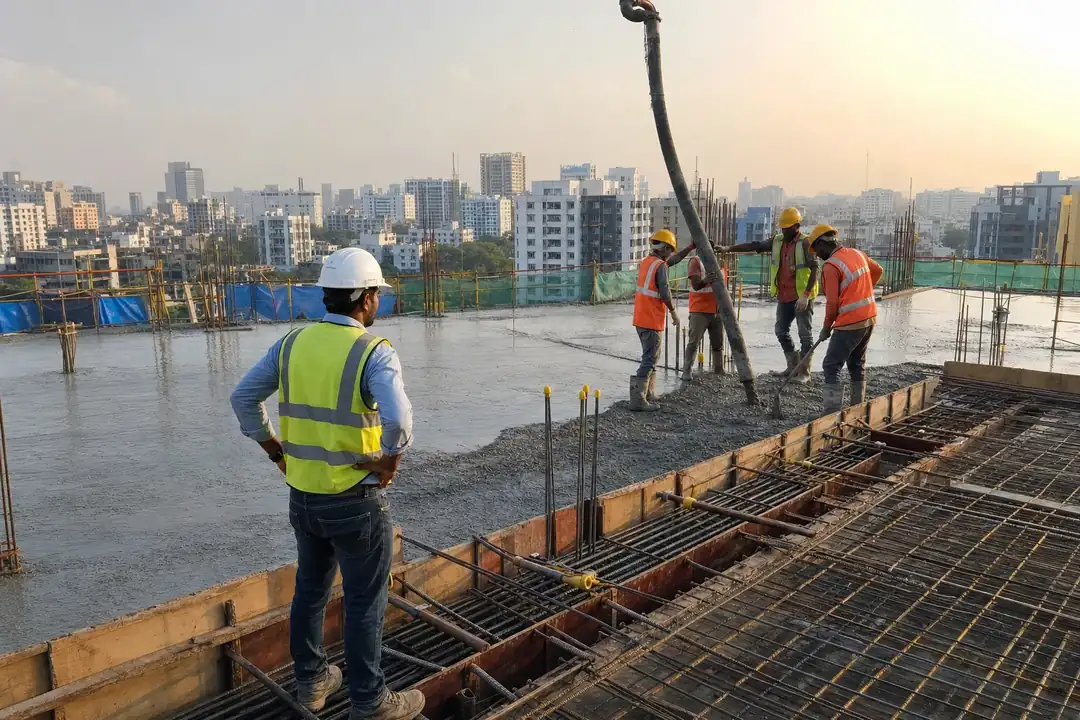
App: plan
From the 3D model, we build your project plan.
The BIM model knows every footing, column and wall. From it we lay out the materials, the schedule and the budget week by week, so what gets built when, and with what, never depends on memory.
Loading the 3D model...
Week 1 of 28
Foundation
- Foundation
- Plinth
- GF columns
- GF slab
- FF columns and slab
- Blockwork and finishes
The delivered model of the house above, built in schedule order. Drag the timeline or the model.
- Budget
- Quantities from the model, priced line by line, so the budget is known before work starts.
- Schedule
- What gets built when, as an MS Project schedule the site can follow.
- Material requirement
- Which material is needed on which week, so nothing is ordered from memory.
App: track
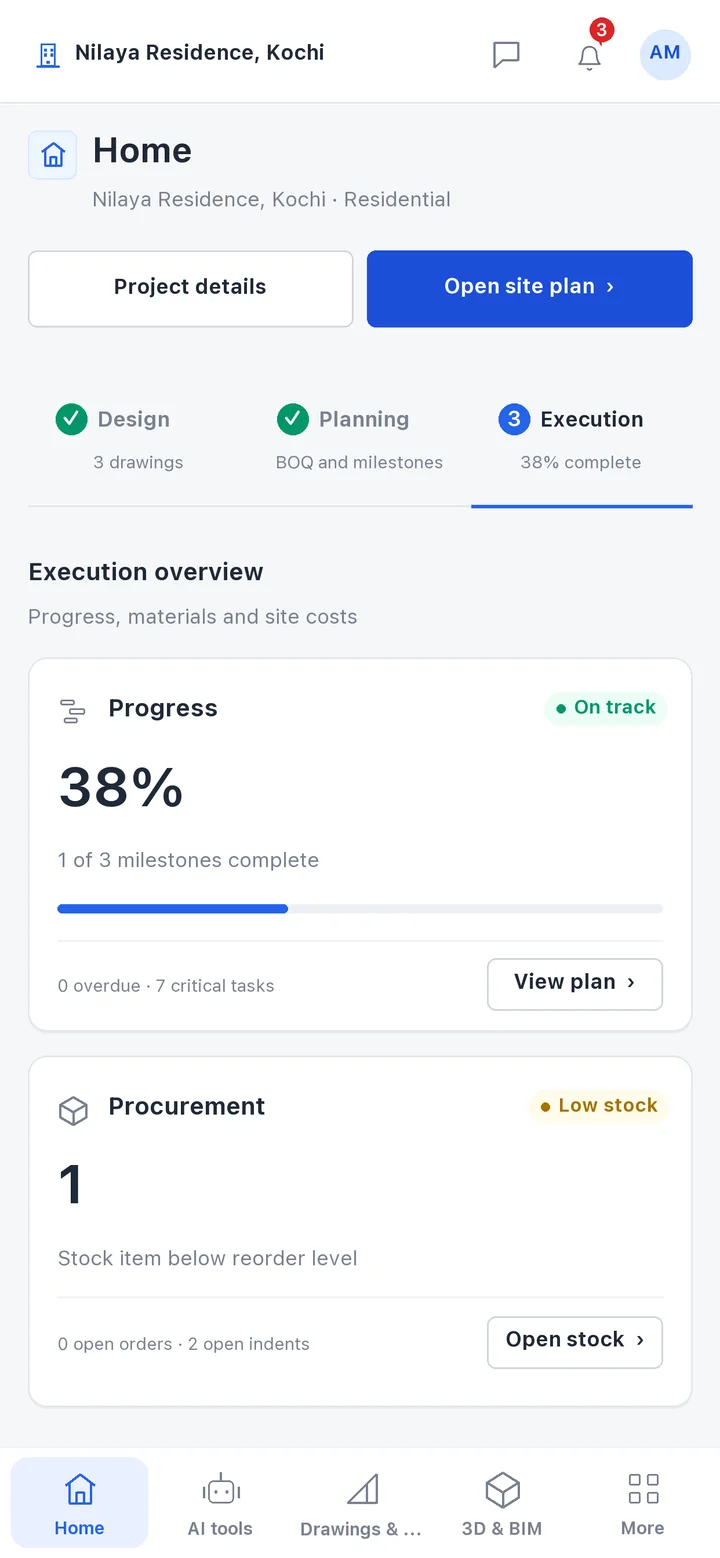
Track the build on screen.
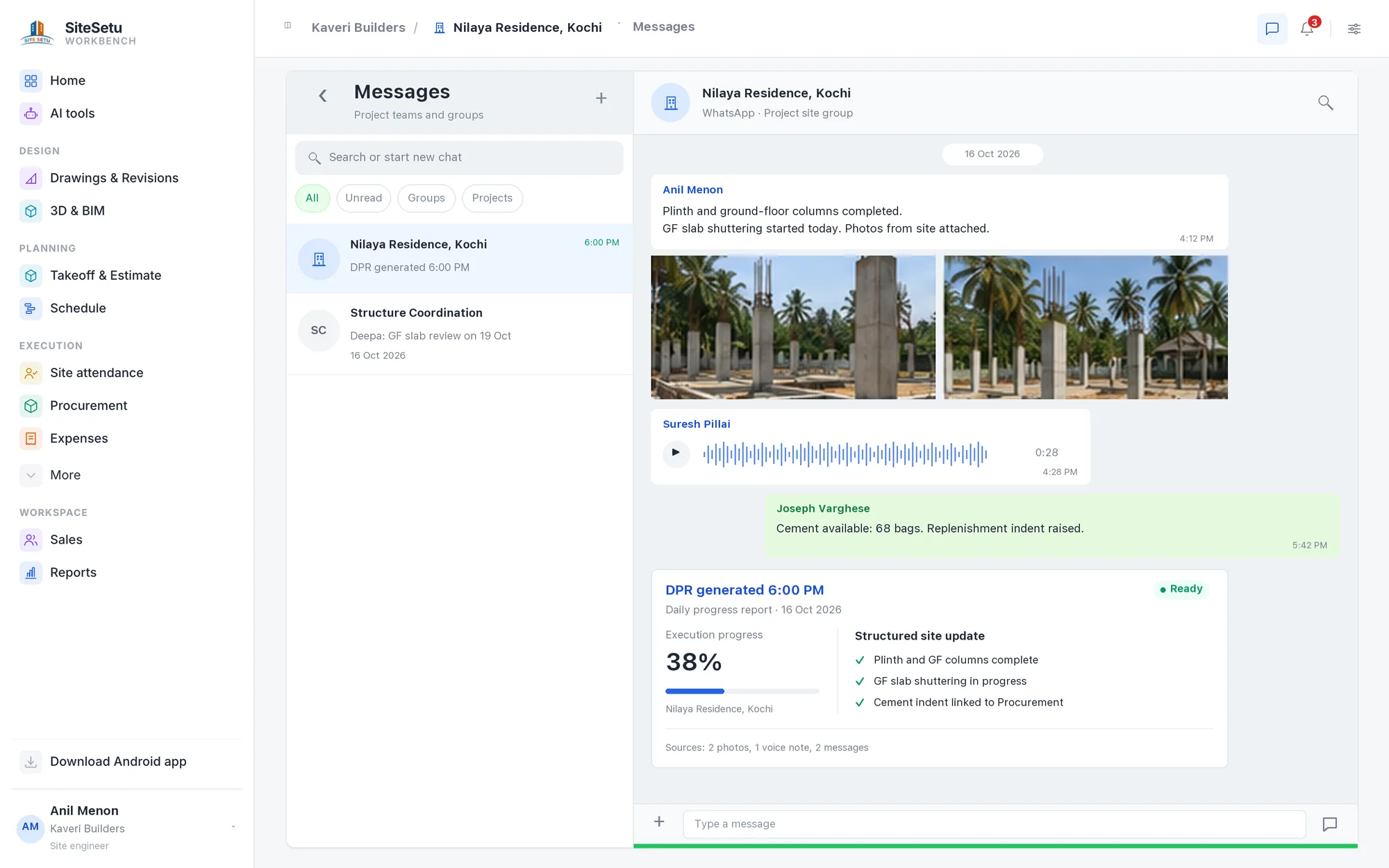
The plan moves into the SiteSetu app. Your team keeps using WhatsApp, and every message and voice note becomes progress, material and issue updates against that plan.
- WhatsApp messages, photos and voice notes organised into the daily progress report by 6pm.
- Progress tracked against the plan, with open issues assigned and followed up.
- Indents, POs, GRNs and material consumption tracked store by store.
Latest guides
- Borewell Cost in India: Drilling, Casing and Pump
- Compound Wall Construction Cost in India: Rates and BOQ
- BOQ for Interior Works: Format, 2BHK Sample and Excel
- Low-Cost House Construction in India: What Actually Saves Money
- Interior Design Cost per Sq Ft in India (2026)
- Shed and Warehouse Construction Cost per Sq Ft in India (2026)
Explore SiteSetu
By role
Cost calculators
- Block calculator
- Wall putty calculator
- Aggregate calculator
- House construction cost calculator
- RCC construction cost calculator
- Steel calculator (TMT bar weight)
- Cement calculator
- Concrete calculator
- Brick calculator
- Paint calculator
- Tile calculator
- AAC block calculator
- Plaster calculator
- Sand calculator
- Square feet calculator
- CFT calculator
- Unit weight of steel chart
- Cement bag weight and volume
- Water tank capacity calculator
- Septic tank size calculator
- Staircase calculator
- BBS calculator
- 1000 sq ft house construction cost
BOQ by project type
Questions
Does SiteSetu prepare BOQs from drawings?
Yes. Send PDF or DWG drawings and receive a measured, priced BOQ with measurement sheets, checked by a civil engineer. Indicative prices start at ₹2,500 per project, with the final quote after we see your drawings. Before you order, you see a sample from a similar real job. First project 50% off (up to ₹5,000), minimum ₹2,500.
How long does BOQ preparation take?
Most BOQs arrive in hours. The upper limit is 48 hours from when we confirm your drawings, depending on project complexity and scope.
Do I need the app to use the BOQ service?
No. The BOQ service stands on its own. Many teams start with a BOQ and move the project onto SiteSetu once work begins.
Who is SiteSetu for?
Teams whose projects already run on WhatsApp, email, drawings, DPRs, and spreadsheets. That means Indian builders, contractors, project heads, planners, site engineers, document controllers, and operations teams. Point SiteSetu at those sources and the project record starts building itself.
What does the first walkthrough include?
Bring one live project. We connect one WhatsApp or reporting source plus the current drawings and schedule, and you watch SiteSetu organize the updates, write the evening DPR, and flag what needs attention.
Does the site team have to stop using WhatsApp?
No: that is the point. The team keeps messaging exactly as today. SiteSetu reads the updates, files them against the activity, drawing, and date, and keeps the original message attached.
How does SiteSetu connect to WhatsApp?
Three routes, and we pick one with you on the first call: forward the group's updates to a SiteSetu number, add SiteSetu to the existing group, or hand us a scheduled chat export. Your site team installs nothing new and keeps the same groups, the same language, and the same habits. We agree the route, the access, and the retention with you before any live data moves.
Can we start without a BIM model?
Yes. Start with your schedule, drawings, and daily records: the WBS, Gantt, and DPR run from day one. A 3D model builds itself once your drawings are clean enough to carry one, and we tell you upfront if they are not.
What happens when the AI reads progress incorrectly?
Correct it in one tap. The DPR, plan, and every linked view update together, the correction is remembered, and the original source stays attached for anyone to check.
Does it work with Hindi, English, and voice notes?
Yes: mixed Hindi-English chat and voice notes are the reality of Indian sites, and exactly what SiteSetu is built to read. We tune it on your own project's chat first, and you can correct any reading in one tap.
How is project data handled?
We agree deployment, access roles, retention, and hosting before your first project starts, and hand you a one-page summary of the controls that apply. We also tell you exactly which certifications that deployment holds: and which it does not.
Can planners keep MS Project and Excel?
Yes. Planners keep MS Project or Excel as the working planning source: SiteSetu imports the plan, keeps it current as the site reports, and exports back in the format your team already uses.
Send your drawings. Get your BOQ quote.
A sample BOQ from a similar real job, with its measurement sheets. Then from ₹2,500 per project, quoted after we see your drawings.